

PrivateInternetAccess Using OpenVPN and Squid Proxy – Squid Configuration
This article in the series walks us through using webmin and configure the squid proxy server to accept and forward connections for clients.
1. Access the interface on https://192.168.101.6:10000

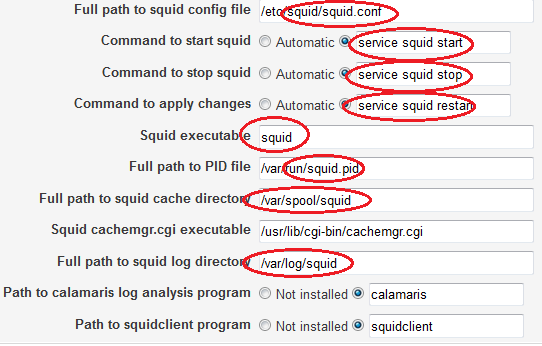
2. On the left-hand side control panel, locate “Unused Modules,” expand this and scroll down to “Squid Proxy Server.” You will see the following error message – click on the circled link to adjust the module parameters:

3. Change all references to “squid3” to “squid” as shown in the circled fields below, click “Save” when finished.
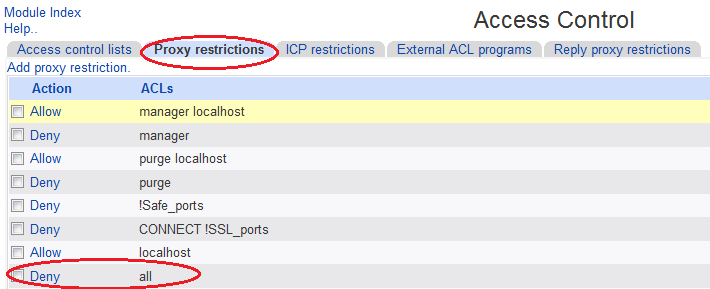
4. As squid denies all connections by default, we need to allow users access. In this example we’re going to allow *all* users to access the proxy – you can of course create access lists based on users / groups etc. but that is beyond the scope of this tutorial. Click on the “Access Control” icon to continue.

Navigate to the “Proxy Restrictions” tab and click the “Deny” link next to “all”:
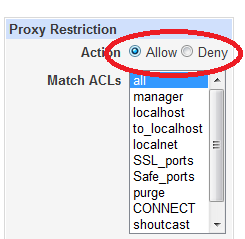
Now simply change the “Deny” to “Allow” and don’t forget to click “Apply changes” on the top right-hand side of the screen!

Job done! You can now check that you have access to the proxy by configuring your browser to use a proxy and then browsing to a website, e.g. www.whatsmyip.org. Here you should see the public IP address of your router.
Now – let’s get anonymised!
[1192]hondaslot77 | Login Resmi Link Alternatif Slot Gacor Hari Ini,hondaslot77 menyediakan link alternatif terbaru untuk akses mudah. Nikmati daftar casino deposit pulsa dengan cara main slot online yang praktis. Daftar sekarang! visit: hondaslot77
I really appreciate how stable the platform is even during peak hours. The games load quickly and the graphics are top notch. I’m sticking with idmdgwin
Fast logins and no annoying lags during the games. It makes the whole experience much more enjoyable. buas33login is doing it right.
I had a small issue with my account and the support team fixed it in less than five minutes. Truly professional service at 0pen88okvip