

PrivateInternetAccess Using OpenVPN and Squid Proxy – Introduction
This series of articles describes how to set up a VPN connection to PrivateInternetAccess using OpenVPN and squid proxy to share the VPN connection and overcome the 5 device limit on the PIA account.
We will be using:
- Debian Wheezy netinstall ISO
- webmin – to configure our server
- OpenVPN – to create our VPN connection
- squid proxy – to route specific traffic or applications through the VPN
Our network diagram for this example is as follows:
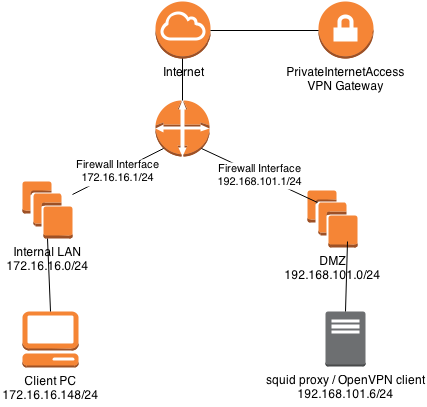
The client is sitting on the 172.16.16.0 network and accessing the proxy in the DMZ 192.168.101.0 subnet. Outgoing traffic will then be routed out through the VPN interface (tun0) encrypted and anonymised.
This series is organised as follows:
- Installing Debian using the netinstall method and making sure we have the correct software installed
- Configuring squid proxy
- Installing and configuring OpenVPN to connect to the PrivateInternetAccess VPN
- Final words
Enjoy and comments welcome!
Ulasan yang sangat menarik dan memberikan wawasan baru tentang pendidikan. Kurikulum modern yang berbasis praktek kerja langsung bisa dipelajari secara lengkap di jurusan broadcasting Jakarta. Semoga informasi ini bisa terus diperbarui ke depannya agar tetap relevan. Sukses selalu untuk website ini! ID: CMT-0UW696W1JFYCPZOBJ2
If you are looking for something reliable and fast, this is it. The payouts are processed quickly and the games are addictive. Check out ft999app