R70, R71, R75, R76, R77 Management Compatibility Matrix
This Management Compatibility Matrix PDF describes which Checkpoint gateway versions can be managed by which smartcenter servers.


Hosting and Security
This Management Compatibility Matrix PDF describes which Checkpoint gateway versions can be managed by which smartcenter servers.
Having functioned correctly for years, I was confronted with the ” Uploaded file was only partially uploaded” error when trying to upload media files for an article. This error seems to have occurred since upgrading to the latest version of WordPress – 4.1.1
Some solutions advocate changing the upload directory permissions to 777 which, apart from being a gaping security hole, does not help in all situations and certainly not this one.
The solution in this case is to tell Apache not to keep the connection open. Modifying this in Apache – site-wide – is not recommended and could break more than it fixes so in this case we can do this for just the upload functionality of the single wordpress site.
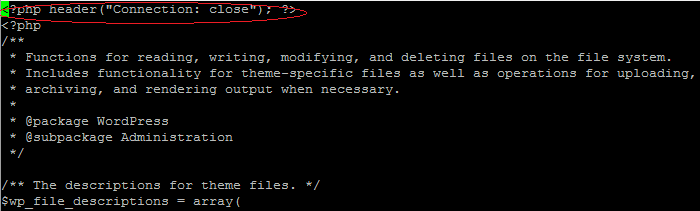
Simply add the following code
<?php header ("Connection: close"); ?>
to the top of the
wp-admin/include/file.php
to make it look like this:
Job done, happy uploading!
If you find Netflix not working on your device – be it a PS3, PS4, Smart TV, Apple TV, Xbox, iPad, Android and so on then you may find the following will help! This experience was with BT as a broadband provider but may well be applicable to others – Talktalk, Virgin, EE etc. – if they offer some type of parental controls.
Your internet is connected and everything else is working, Netflix is the only problem. If you have delved into the logs you may find something like:
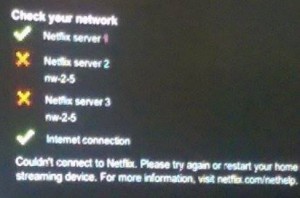
You have probably tried one or more of the following:
If you have BT’s “Parental Controls” enabled then you will not be able to resolve addresses unless you (i.e. your router) are using BT’s DNS servers – change your DNS server on your router to something else and your connections will die very quickly.
It would also appear that Netflix is not the only service to be broken by these controls.
Turn off BT Parental Controls – preferably permanently if you can. Should you just disable them temporarily then they may come back and bite you in the future – every time BT updates their controls they seem to be turned on again by default.
Should you wish to turn off your BT Parental Controls at any time there’s a simple way to do this whilst keeping your settings, should you wish to reactivate Parental Controls. Here’s how:
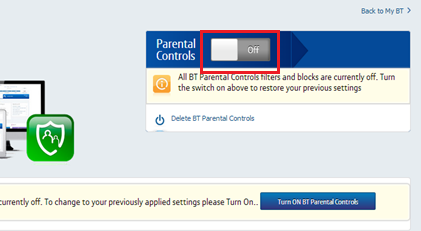
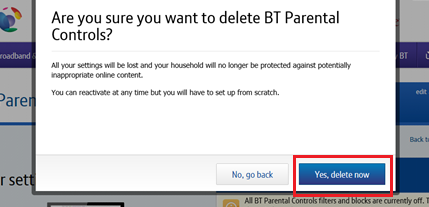
If you still want to delete BT Parental Controls completely, first turn them off temporarily by following the steps above.
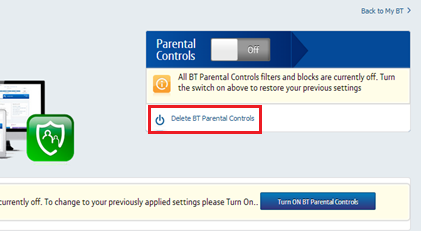
Hope this helps! Let us know if you have found a different solution which works for you ..